A school calendar PDF, a photo of the handout on your fridge, a CSV out of a spreadsheet, a Google Doc or Drive link, or text pasted out of an email. A season fixture list, a course syllabus, a shift rota, a conference agenda. It does not have to be tidy, and it does not have to be in any particular format. You get back a file that opens straight in Google Calendar, Apple Calendar or Outlook, or a CSV if you would rather have rows. Free, no sign-up.
Drop a PDF, screenshot or CSV hereor click to choose · PDF, PNG, JPG, CSV, TXT · up to 5 MB
or paste a link (a web page, Google Doc, Sheet or Drive file)
or paste the text
events found
Put these straight in your calendar. Download the file and open it — Google Calendar, Apple Calendar and Outlook all take it. No account, no add-on.
Check the dates before you import — it reads what the file says, and files are sometimes wrong. The spreadsheet rows are in Calendar Sync column order, so they paste into the first empty row under the headers.
From Marinette
Rather keep the whole thing in a Google Sheet™?
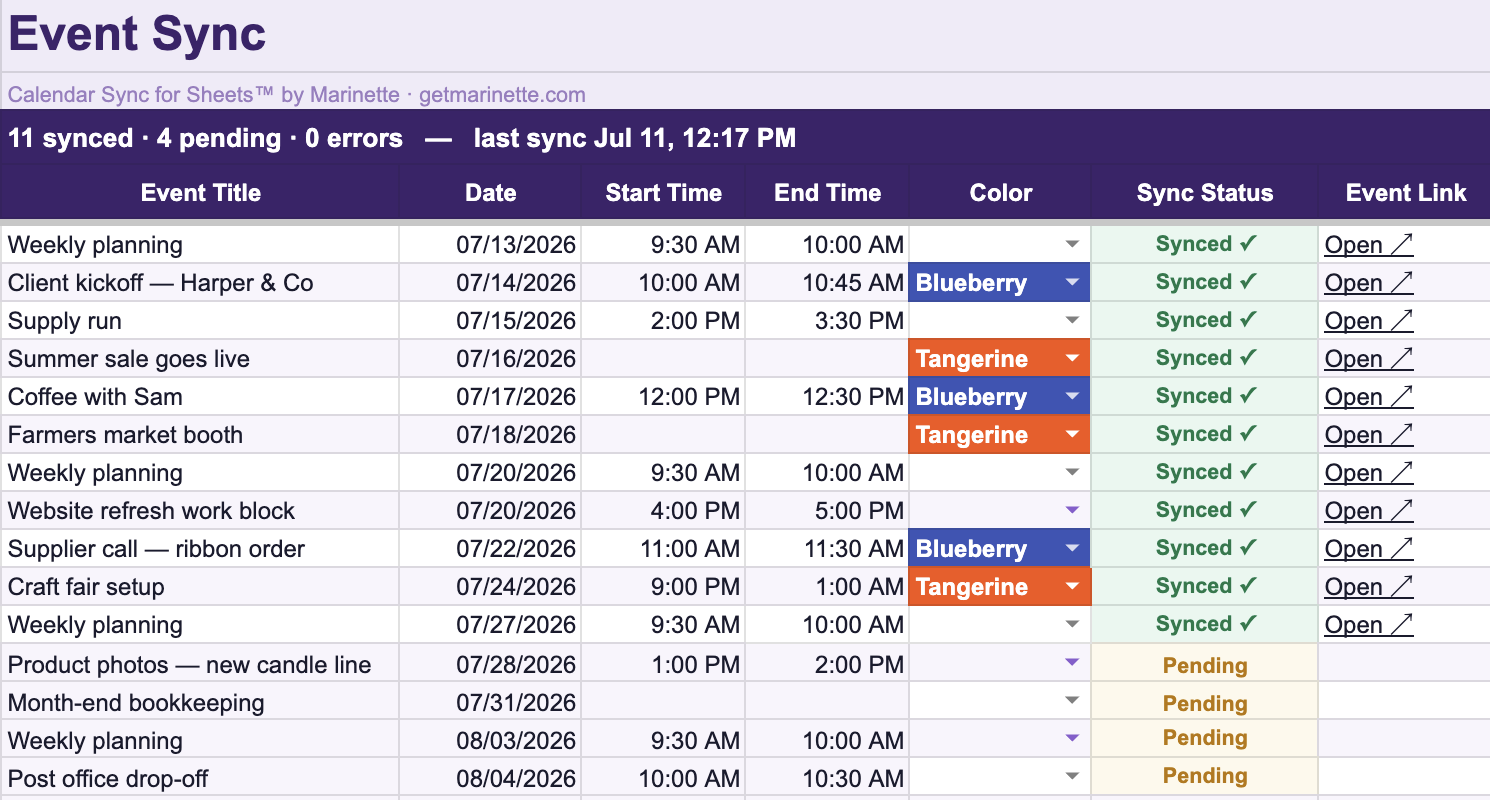
Calendar Sync keeps a Google Calendar™ matched to a spreadsheet. Type the schedule as rows and the events appear. Change a row and the event changes with it. Nothing doubles up and nothing quietly goes stale.
That is the one thing a downloaded file cannot do. The file you just made is right for today, and the next time a date moves you are back here starting over.
Give it a schedule: a PDF, a photo of a handout, a CSV, a link, or pasted text.
It reads the dates, works out the year, and turns date ranges into one row per day.
You look over what it found, then download the calendar file and open it. Or copy the rows into a spreadsheet instead.
Your file is sent to Anthropic’s Claude API to be read, and the events come back. I don’t store your file or the events — nothing is kept once your browser has the rows. Anthropic’s commercial terms state they do not train their models on customer content.
Ways to give it a schedule
A PDF
The most common one, and the one it handles best. Awkward layouts are fine: two columns, a month per box, dates written as ranges.
A screenshot or photo
A picture of a handout, or a screenshot of a schedule on a screen. PNG, JPG, GIF and WebP all work. A photo taken at an angle in bad light usually still reads.
A CSV or text file
Export from Excel, Numbers or Sheets and upload the CSV. A plain .txt file works the same way.
A Google Doc, Sheet or Drive link
Paste the share link and the document itself gets read, not the page around it. A Drive link to a PDF works too. The file has to be shared with anyone who has the link, otherwise there is nothing to open.
Any other link
A link to a school or club calendar page. Pages that build their calendar after loading have no dates in them to read, and you get told that rather than a wrong answer.
Pasted text
Copy the dates out of an email or a page and paste them into the box. Often the cleanest read of all, because nothing has to be recognized first.
What people bring here
School and district calendars
The PDF the school sends home in August, with the first day, the half days, the breaks and the teacher training days scattered across a grid. This is the one it was built for, and it handles the awkward layouts: two columns, a month per box, dates written as ranges.
Sports and activity schedules
A season fixture list, a swim meet timetable, a practice schedule for the term. Times and locations come through alongside the dates when they are in the document.
Course syllabi and reading lists
Assignment due dates and exam dates buried in a syllabus, so the whole semester lands in your calendar in one go instead of being copied out a line at a time.
Work rotas and shift schedules
A rota posted as an image or a PDF, including the ones that are really a screenshot of a spreadsheet. If a person can read it, it has a good chance of working.
Conference agendas and travel itineraries
A multi day agenda with sessions at set times, or an itinerary with flights, check ins and bookings running across several days.
Questions
Does it have to be a PDF?
No. A PDF, a photo or screenshot, a CSV or text file, a link to a web page, a Google Doc, Sheet or Drive link, or text pasted straight into the box all work. The PDF is just the most common thing people have.
Can it read a Word document?
Not directly, and rather than pretend otherwise it will tell you so. Three ways round it, any of which take a moment: save the document as a PDF and upload that, or open the text and paste it into the box, or put the file in Google Drive, open it as a Google Doc and paste the share link. The same goes for Excel, where exporting to CSV is the quickest route.
What is an .ics file?
It is the standard calendar format that every calendar app understands. You download one file and open it, and the events appear. Nothing is connected or synced, and no account is linked.
Does it work with Apple Calendar and Outlook?
Yes. The same file opens in Google Calendar, Apple Calendar and Outlook. You can also copy the rows into a spreadsheet instead if you would rather have them as a list.
Is it actually free?
Yes, and there is no sign-up, no account and no email address to hand over.
What happens to my file?
It is sent to be read, the events come back, and nothing is kept once your browser has the rows. The file is not stored and neither are the events.
It got a date wrong. What now?
Look over the events before you download, which is why they are shown as a list first. Undated or oddly written entries are where mistakes happen. Fix anything that looks off in your calendar after importing, or paste the text in on its own for a cleaner read.
Will it keep my calendar up to date?
No, and that is worth knowing before you start. A calendar file is a snapshot of the day you made it. If the school moves a date afterwards, your calendar still shows the old one, and importing the file again gives you every event twice. Calendar Sync is the tool for keeping a calendar matched to a schedule over time.