Rent Tracker · For Small Landlords & Rental Property Owners

Rent was due on the first. Who actually paid?

You log the payments. That is the whole job. The sheet works out every unit's balance, marks it paid, short, or due, writes the list of who still owes, drafts the reminder email, and keeps your Schedule E expenses while it is at it.

Get the Rent Tracker on Etsy →

Instant digital download · Works in free Google Sheets™ · Built by a former landlord

See it work

One payment in, and the sheet catches up

Unit 2B is due. The payment gets logged, and the status flips to paid on its own.

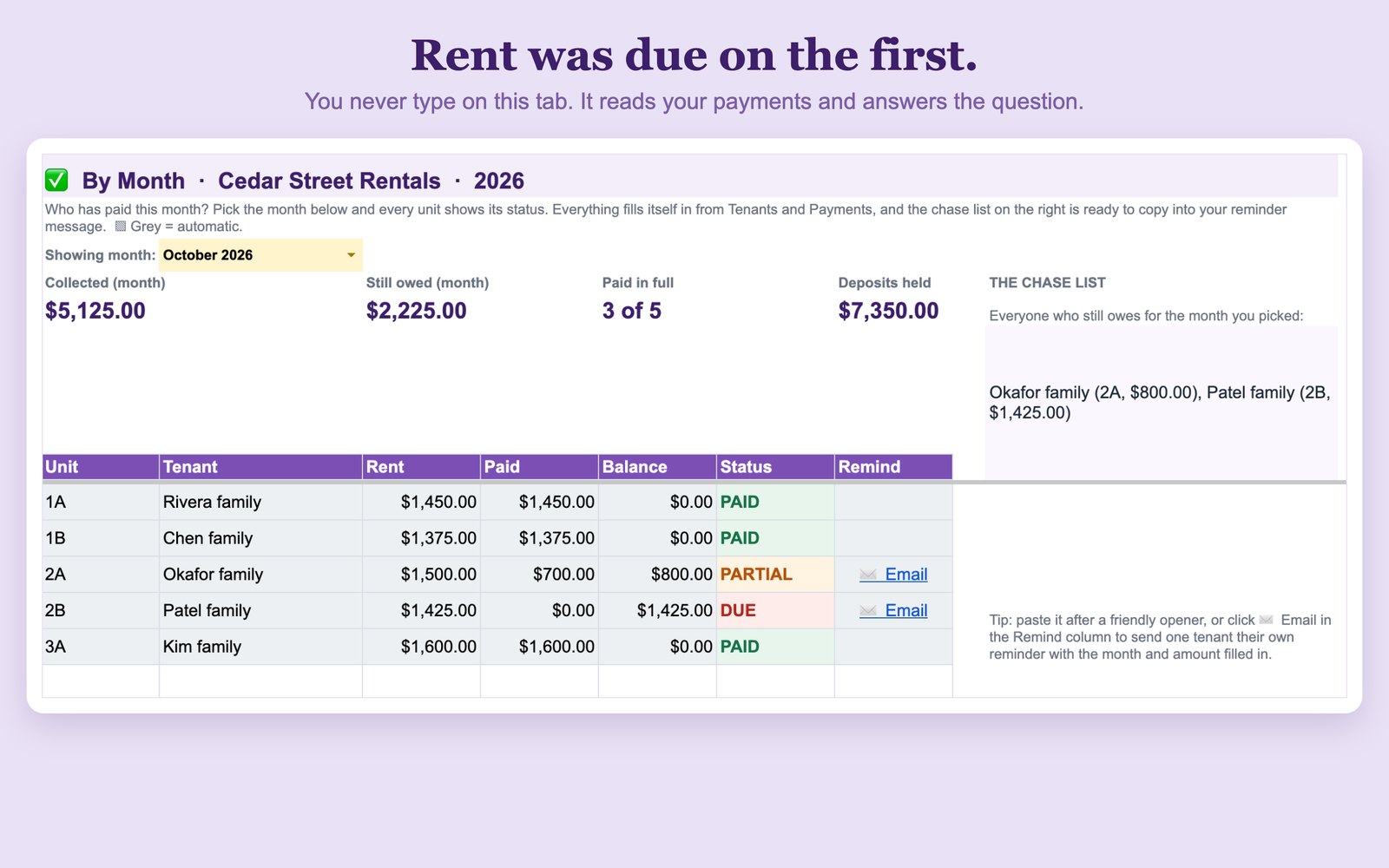
Rent tracker showing every unit as paid, partial, or due for the month
Pick a month and every unit shows where it stands.
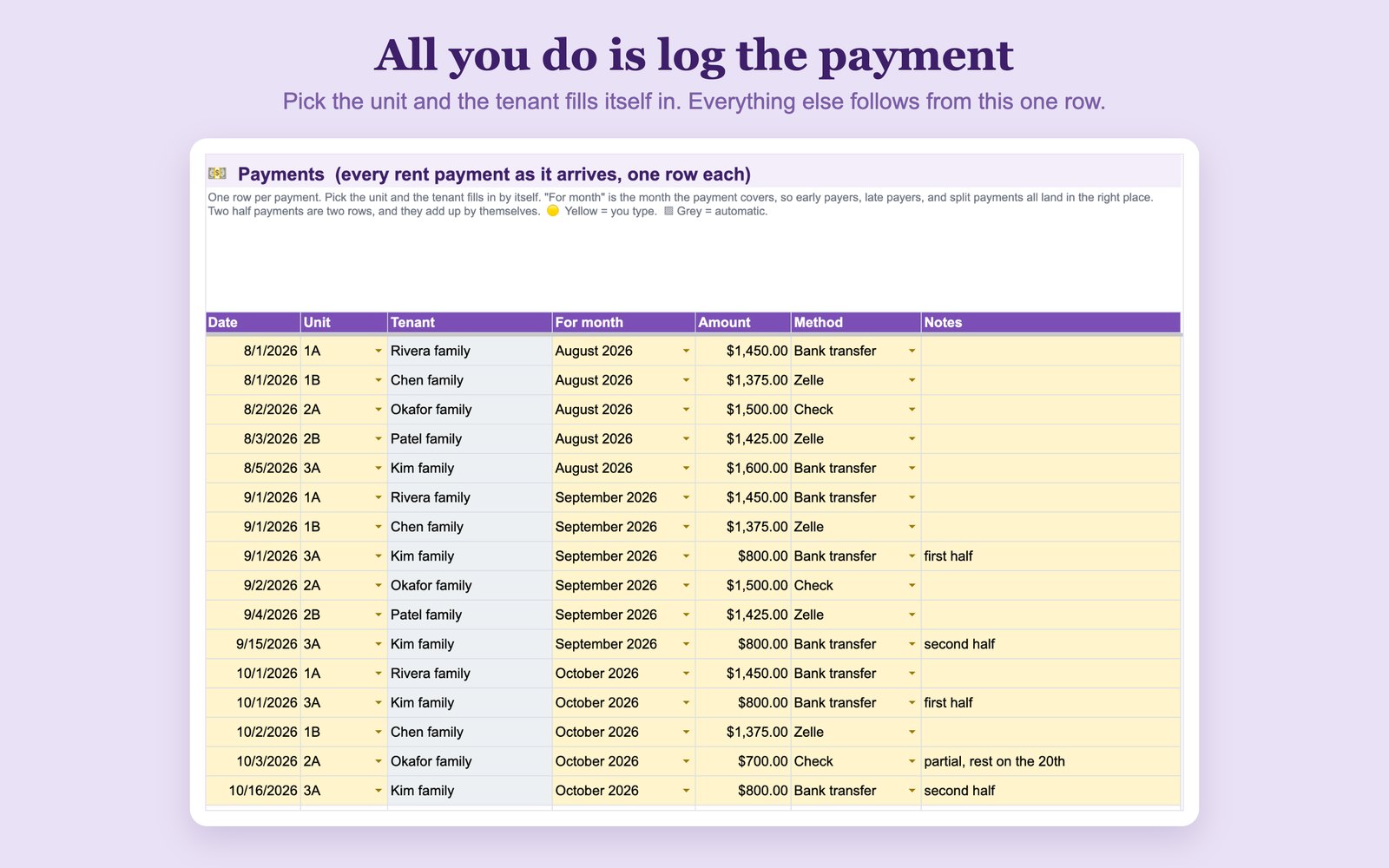
Logging a rent payment with the month it covers
The one thing you do: log the payment.
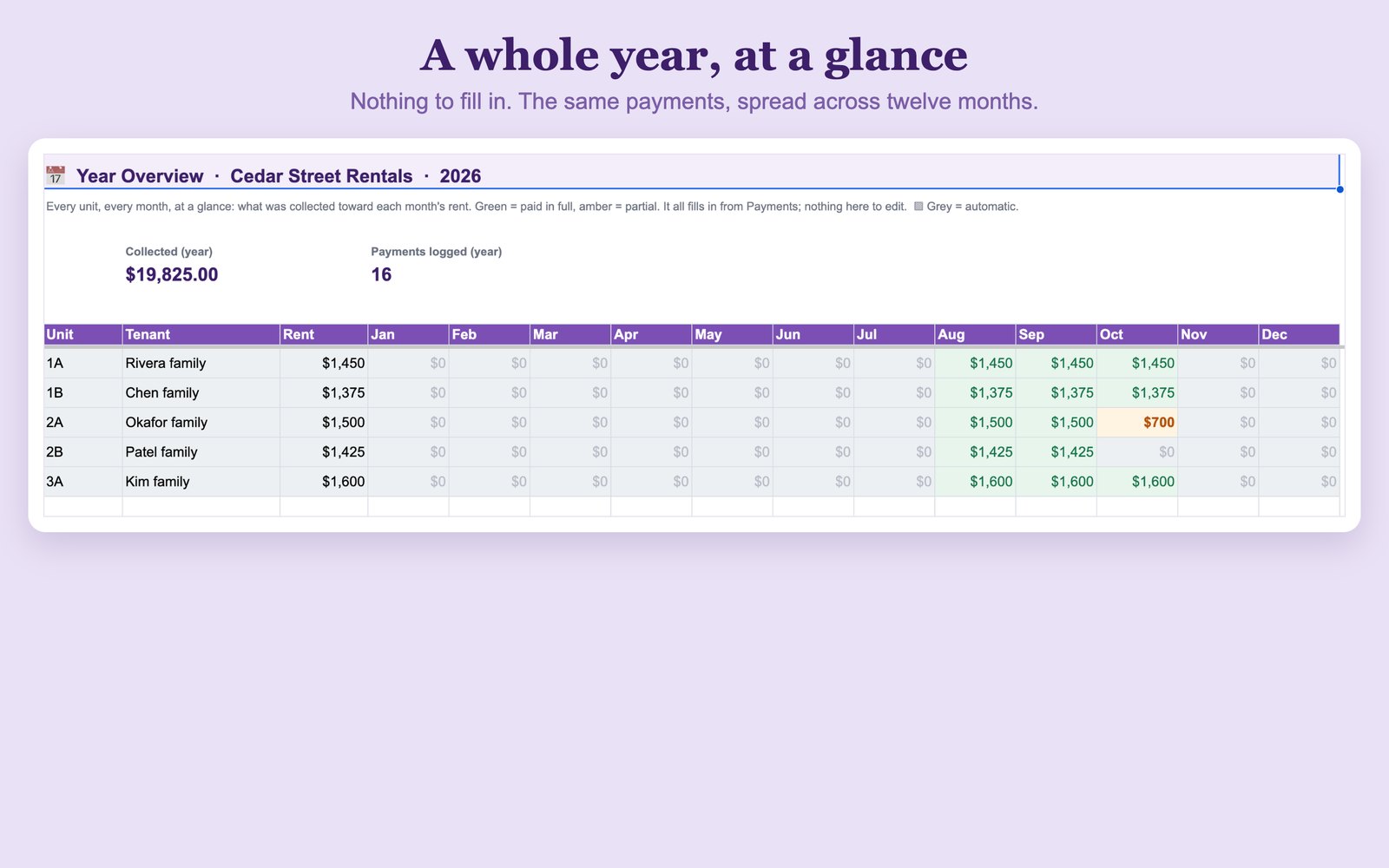
Year overview grid of every unit across twelve months
Every unit, every month, on one screen.

What's inside

Six tabs. One thing to keep up with.

By Month

Pick a month and every unit shows PAID, PARTIAL, or DUE with its rent, what came in, and what is left. Totals at the top for collected, still owed, units paid in full, and deposits you are holding.

The late list

Everyone who still owes that month, with unit and amount, in one block ready to paste into a message. When everyone has paid, it tells you to enjoy the quiet.

One-click reminders

Each unit that still owes gets an Email link that opens a pre-written friendly reminder with the month and the exact amount filled in. You read it, you send it. Nothing goes out on its own.

Year Overview

Every unit across all twelve months on one grid, green when a month is covered and amber when it is short. Nothing to fill in; it reads the same payments.

Tenants & Payments

One row per unit with tenant, rent, deposit held, and lease start. Then one row per payment, tagged with the month it covers. Room for 100 units and 1,200 payments a year.

Expenses, Schedule E style

The books kept as you go, in the usual Schedule E categories, with totals by category current all year so tax time is a copy-out instead of a dig.

Built by a former landlord

Every other rental spreadsheet is bookkeeping only: money in, money out, a total at the bottom. That is what you need in April. It is useless on the fifth of the month when you are trying to remember whether 2B paid, and whether you already asked them about it.

This one answers that first. Then it keeps the books anyway, so both halves of the job live in one file.

It survives real life. Partial payments, a tenant who always pays in two halves, someone who pays March in February. Every payment is tagged with the month it covers, so the status is worked out from what actually arrived rather than from the calendar.

One file, year after year. Change the Year in Settings and the months, the board, and the overview all follow, while past years stay saved so you can flip back and look.

How it works

Yours in about a minute

1

Buy it on Etsy

Instant digital download. Nothing ships.

2

Make your copy

One click saves your own private copy to Google Drive, or open the Excel version instead.

3

Add your units

Then just log the rent. The sheet does the rest.

Landlord questions, answered

Keep one list of units and one log of payments, and let a spreadsheet connect them. In this tracker you add each unit once with its tenant and monthly rent, then log every payment as it arrives with the month it covers. Pick a month and every unit shows PAID, PARTIAL, or DUE, with the balance still owed and a late list already written for you.
Every payment is tagged with the month it covers, not the day it arrived, so early payers, late payers, and split payments all land in the right month. Two half payments are simply two rows and the sheet adds them up: the unit shows PARTIAL with the remaining balance until the rent is covered, then flips to PAID on its own.
No, and that's on purpose: nothing goes out without you. Each unit that still owes gets an Email link that opens a pre-written friendly reminder with the month and the exact amount already filled in. You read it, then you send it. There's also a late list you can paste into a message yourself.
Yes. There's an Expenses tab using the usual Schedule E categories, with totals by category kept current all year, so tax time is a copy-out instead of a dig. Leave the unit blank when something covers the whole property. It's general guidance, not tax advice, so always confirm with a qualified tax professional.
Up to 100 units and 1,200 payments a year, which covers everything from a single rental to a small portfolio. It's one file year after year: change the Year in Settings and the months, the By Month tab, and the Year Overview all follow, while past years stay saved so you can flip back and look.
Yes. Every purchase now includes a Microsoft Excel version alongside the Google Sheets™ one, at no extra cost. Both are in the same download, so you can use whichever you already work in. The Excel file opens in Excel and in the free Excel for the web, with no Google account needed.

Stop checking your bank feed

Instant download · Questions first? Email me. I'm a real person and I answer.

Get the Rent Tracker on Etsy →

Wish it did something it doesn't? Tell me what's missing. Those emails decide what I build next.

More spreadsheets for small business life are on the templates page.