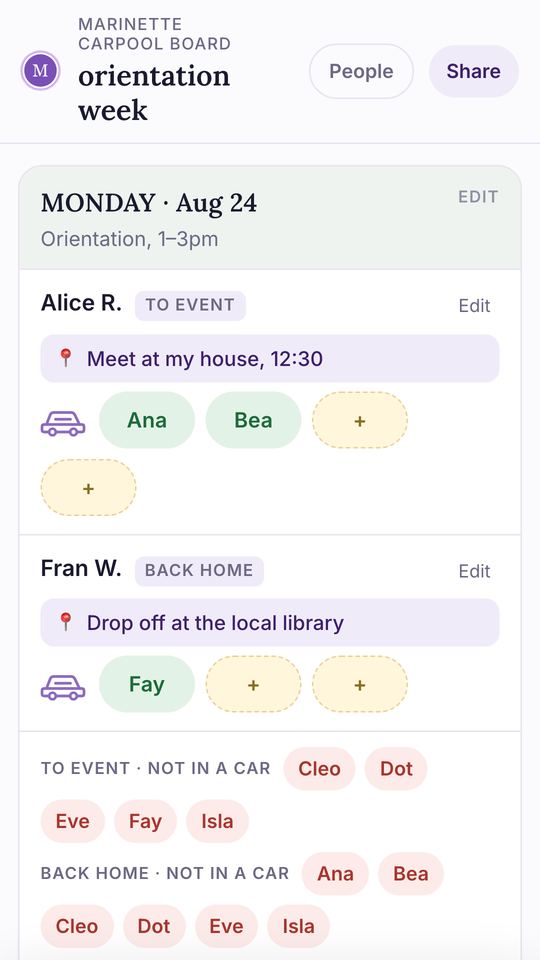
The hard part of a carpool isn’t fairness. It’s legibility. Almost nobody is counting whose turn it is, and almost everybody has lost track of who’s driving on Thursday. Put the answer somewhere it can’t scroll away, and most of the rest sorts itself out.
What follows is the whole thing start to finish: how to set up a carpool schedule, what belongs on it, and how to keep it running once the season starts. It takes about half an hour the first time, and about two minutes a week after that.
The six steps
1
Decide what it covers
Orientation week. The swim season. One tournament weekend. A carpool with no end date is the one that falls apart.
2
Gather the families
First names of the kids, a phone number for each driver. Four to eight families is the size that works.
3
Pick the days
Every date and what’s happening on it, including the maybes. Removing a day is easier than adding one later.
4
Put it where it stays put
The step that decides whether this works at all. Not buried in the chat. More on this below.
5
Fill the seats
One row per car, one seat per name, and which direction it covers. Leave the empty seats visible.
6
Agree three rules
Running late, dropping out, and who else is allowed in the car. Five minutes now saves the season.
Where the carpool schedule lives is the whole decision
Every group starts in the group chat, and every group discovers the same thing: a chat is a river, and a schedule is a noticeboard. By Wednesday the plan is forty messages up, three people have written their own summary of it, and somebody is asking who has Thursday. Here’s the honest version of each option:
The group chat
- Everyone’s already in it, and that counts for a lot.
- But the answer scrolls away, and the newest message wins even when it’s wrong.
- Offers expire silently. Two seats offered at 9pm are gone by 10pm and nobody else knows.
- Fine for the conversation. Bad at holding the answer.
A spreadsheet
- It holds still, everyone sees the same one, and you keep it after the season.
- Use dropdowns for names, or you’ll get six spellings of the same kid.
- Phones are the catch. A wide sheet is awkward in a parking lot at pickup.
- Best when one person keeps it and shares a link into the chat.
A link everyone can edit
- Pin it once. Nobody signs up, nobody installs anything.
- Built for a phone, so a parent can fill a seat standing at the kerb.
- Anyone can fix a mistake, so a small change does not have to wait on you.
- The trade is that anyone can change it, same as a sheet on the fridge.
Paper still works too, and for a small group it works well. A sheet by the sign-in table catches the parents who never read the chat at all.
What a carpool sign-up sheet needs
It doesn’t matter much whether you start from a carpool schedule template, a spreadsheet of your own, or a printed page for the fridge. It needs six columns. That’s genuinely it, and the temptation to add more is what kills these:
- The date, and what’s happening. “Tue 9/2, practice 4pm” beats “Tuesday” every time.
- Which direction. To the event or back home. Half the confusion in a carpool is someone covering one leg when the group assumed both.
- Who’s driving. One row per car, not one row per kid.
- How many seats that car has. For other people’s kids, not counting their own.
- The names in those seats, and the empty ones left visible so people can see where to ask.
- A phone number for the driver. One place, so nobody is hunting for it at 7:40 am.
Anything past those six goes unfilled. Pickup addresses, allergy notes, car makes: they feel useful when you build the sheet and they sit empty all season.
Splitting the driving, and why nobody should keep score
This is the part people brace for and it’s usually the easy part. Most school and sports carpools never split money. They split turns, loosely, and nobody counts. The groups that run into trouble aren’t the ones where somebody drove twice as much. They’re the ones where nobody could tell who was driving at all.
- Split turns, not costs. Roughly even over the season is even enough for almost every group.
- When money genuinely comes up, it’s long distance, tolls, or a tournament weekend with real mileage. Agree that whoever drives furthest gets covered for gas, and say so in the first message rather than in week six.
- Watch the quiet imbalance instead. One parent with a flexible job ends up doing most of it and won’t say a word. If the schedule is visible, everyone can see it happening, which is usually enough to fix it.
The three rules worth agreeing up front
Five minutes at the start, and you avoid nearly every awkward conversation later:
- Running late. Text the group, not just the one parent. And say how late, because “on my way” means nothing at 7:45.
- Dropping out. How much notice you give when your kid isn’t riding. The night before is a fair ask. Same morning happens, and it’s fine as long as it isn’t weekly.
- Who else is in the car. Nobody adds a passenger without telling the driver first. This is the one that actually matters, and it’s the one nobody thinks to say.
Car seats deserve their own sentence: if a child needs one, whoever is driving needs to have it, and it needs to be installed before the morning it’s needed. Sort that in week one.
If it falls apart halfway through the season
Most carpools sag somewhere around week four. It’s normal, and it’s fixable:
- It usually isn’t conflict. It’s that the schedule stopped being visible, so people quietly went back to driving their own kid.
- Re-pin the link and post one message with next week only. A short ask gets answered. “Can everyone confirm the rest of the season?” gets silence.
- Shrink it before you cancel it. Three families covering Tuesdays beats eight families covering nothing.
- Let it end when the season ends, and don’t roll it over by default. Restarting on purpose is easier than reviving something everyone stopped opening.
If you want the ready-made version of all this: the free carpool board is one link you pin in the chat, where anyone can tap a seat and add their name. If you’d rather own the file, the Carpool Sign-Up Sheet is the same layout as a Google Sheets™ template, with a printable page in the same download.
Words that come up
Leg
One direction of one trip. To the event, or back home.
Seat
A spot in someone’s car for someone else’s kid.
Rotation
Whose turn it is to drive, in a repeating order.
Carpool lane
Different thing entirely. That’s a commuting rule, not this.
Kiss and ride
The drop-off loop at school. No parking, keep moving.
Point person
Who fields the questions. Useful. Not the same as who keeps the schedule.