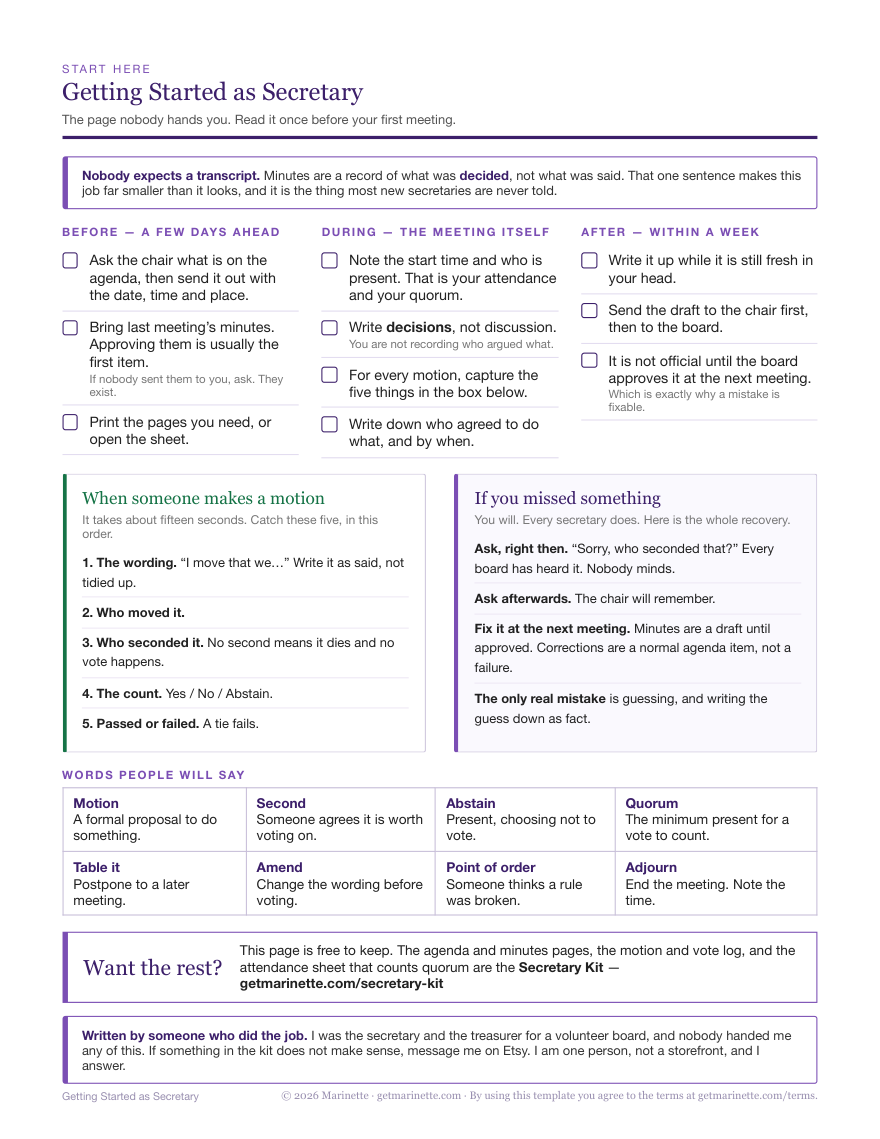
You were voted in, not trained. This is the one page nobody hands the new secretary: how to prepare for a meeting, how to write the minutes, the five things to record when somebody makes a motion, and what to do when you realize you missed something.
One page · US Letter · Free, and there’s nothing to sign up for
Nobody expects a transcript. Meeting minutes are a record of what was decided, not what was said. Once somebody tells you that, writing them up gets a lot smaller than it looked.
Before, during, and after your first meeting
1Before: how to prepare
Ask the chair what’s on the agenda, then send a copy of the agenda inside the meeting invite.
Bring last meeting’s minutes. Approving them is usually the first item. If it’s your first meeting as secretary you may not have them yourself, but someone has them and it’s required to bring them.
Have your minutes template ready to fill, printed or open on your laptop.
2During: taking the minutes
Note the start time and who is present. That’s the attendance and the quorum check.
Write decisions, not discussion. You’re not recording who argued what.
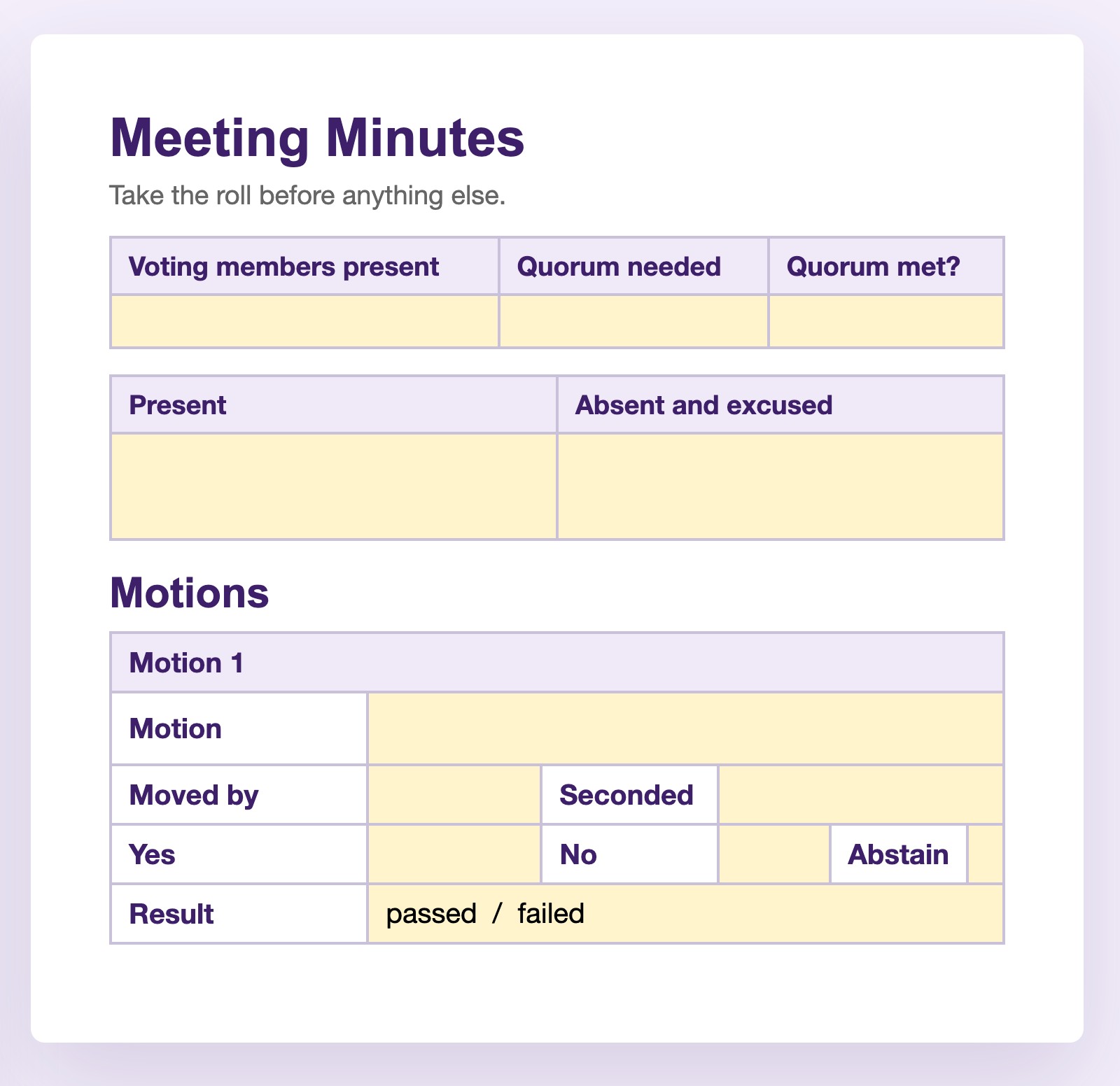
For every motion, capture five things. They’re listed below, and the minutes guide walks through the whole meeting.
Note the time you adjourn. That’s the last line of the minutes.
3After: writing up the minutes
Finish the minutes within a day or two, while the meeting is still fresh in your head.
Send the draft to the chair first and ask for feedback, then send it to the board for their review.
The minutes aren’t official until they get approved (via motion) at the next meeting, so don’t worry about the feedback that comes back while they’re being reviewed.
When someone makes a motion
It takes about fifteen seconds. Someone moves it, someone seconds it, hands go up, and the room has already moved on while you’re still writing. Catch these five, in this order:
1. The wording. “I move that we…” Write it as it was said, not tidied up.
2. Who moved it.
3. Who seconded it. No second means the motion dies and no vote happens.
4. The count. Yes, no, abstain.
5. Passed or failed. A tie fails.
And the first motion of the night is often yours: approving last meeting’s minutes. You move it, somebody seconds it, and you write yourself down, which feels strange exactly once.
You will. Every secretary does. Here’s the whole recovery:
Ask, right then. “Sorry, who seconded that?” Every board has heard it. Nobody minds.
Ask afterwards. The chair will remember.
Fix it at the next meeting. Minutes are a draft until the board approves them, so a correction is a normal agenda item and not a failure.
The only real mistake is guessing, and writing the guess down as fact.
What it was actually like
I was the secretary on a PTA board. Here’s what that job was like from the inside.
What did you take minutes in? A laptop. I started by deleting the notes out of an old copy of the minutes and filling in the blanks, and it didn’t work. I needed an actual template, with a guide.
How did your first meeting go? My first meeting was fine, but I felt like I was working really hard to keep everything accurate. I was making up the whole motion thing as I went, and not very good at it, since no one explained it to me.
How fast do motions really happen? So fast. It is so hard to see who seconds, usually. I just started asking, and people grew to appreciate my carefulness.
What surprised you about the job? The notes are public and have to be filed perfectly, so they need to have all the right info in them.
How long does writing them up take? Not that long. Maybe 10 to 15 minutes.
Did anyone ever correct your minutes? I think they edited my notes a lot at the beginning to clean them up. Sometimes they would make corrections or ask for changes, and it was actually super helpful for my learning.
What’s the annoying part? The annoying part of the job is worrying that you will mess something up.
That template problem is what the Secretary Kit solves, and more: every piece of a motion gets its own box, so you fill in blanks instead of remembering.
Words people will say
Motion
A formal proposal to do something.
Second
Someone agrees it’s worth voting on.
Abstain
Present, choosing not to vote.
Quorum
The minimum present for a vote to count.
Table it
Postpone to a later meeting.
Amend
Change the wording before voting.
Point of order
Someone thinks a rule was broken.
Adjourn
End the meeting. Note the time.
Other officers on your board might feel just as lost as you are. There’s a free one-page guide for taking over as treasurer, and one for taking over as president. Same deal: one page, no email.
Keep it beside you
Print the one-pager
Everything above, on one sheet of US Letter. No second page, no filler.
This one-pager is included, and stays free here either way.
Questions
Secretary questions, answered
Decisions, not discussion. The date and place, who attended, whether you had quorum, that the previous minutes were approved, each motion with its exact wording, who moved and seconded it, the vote count, and who agreed to do what by when. You don't record who argued which side, or anyone's opinions including your own. Minutes are usually a public record that gets filed, so completeness matters more than polish. The full walkthrough is here: how to write meeting minutes.
Ask right then. Sorry, who seconded that? is a normal thing to say and every board has heard it. If the moment has passed, ask the chair afterward. And if you only notice later it still isn't a problem: minutes are a draft until the board approves them at the next meeting, so corrections are a routine agenda item. The only real mistake is guessing and writing the guess down as fact. In my own meetings the seconds went by so fast that I just started asking every time, and people grew to appreciate the carefulness.
The wording as it was said, who moved it, who seconded it, the vote count of yes, no and abstain, and whether it passed or failed. A motion with no second dies and no vote happens. A tie fails.
It means another member agrees the proposal is worth putting to a vote. It isn't agreement with the motion itself. Without a second the motion dies and the board moves on without voting.
Quorum is the minimum number of voting members who must be present for a vote to count. If you didn't have quorum, decisions made at that meeting can be challenged later, which is why it belongs at the top of your minutes. Your bylaws set the number.
Yes. Minutes are a draft until the board votes to approve them, usually as the first item of the following meeting. That's your safety net: anything wrong gets corrected in the approved version.
On most boards it's the minutes: the secretary distributes or reads the previous meeting's minutes and the board votes to approve them. If your bylaws list a separate secretary's report, it usually covers correspondence the organization has received. Either way, the minutes are the document that gets filed, so that's where the care goes.
If you want the rest of it
The Secretary Kit
Everything they should have handed you on day one, in whichever form you actually work in. This guide comes with it, and stays free here either way.
If you like paper
A 15-page binder
Agenda, minutes, the motion and vote record, attendance log, board roster, spine labels. Three-hole punch and go.
If you’d rather type
A Google Doc™
The same agenda and minutes on tables, not fill-in lines. Click a yellow cell and type. Nothing shifts.
If you want it counted
A Google Sheet™
Quorum, vote results and the overdue list work themselves out while you listen to the meeting.