Back to school

Add the school calendar to Google Calendar™

Picture day, early release, break weeks, the concert: the school year runs your year, and it deserves to be on your calendar. If the school publishes a calendar feed, subscribe. That is genuinely the best answer, and it is covered first. When all you have is a PDF, a newsletter, or a calendar page that will not import, here is the free way to move the whole year at once.

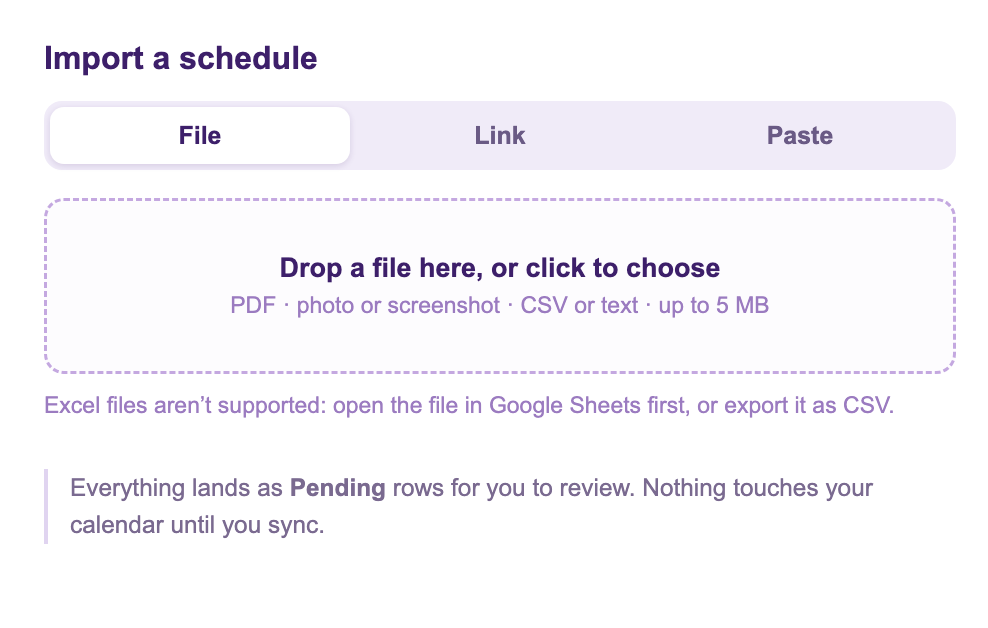
The Add from Schedule dialog with File, Link, and Paste tabs, accepting the school's PDF calendar or newsletter text
The school's PDF or newsletter becomes event rows, marked Pending until you look them over.

Reads school PDFs · from Marinette

Calendar Sync for Sheets™

Install free from the Marketplace →

Free preview · Handles school-year dates · Review before anything syncs

First, check for the feed. Subscribing beats importing

Many schools and districts publish a live calendar feed, and if yours does, use it: in Google Calendar™ on a computer, next to Other calendars click +, choose From URL, and paste the feed link. A subscribed calendar updates itself when the school moves picture day, which nothing else on this page can do. Look for the words Subscribe, iCal, or Calendar Feed on the school's calendar page, often near a printer icon. If the feed exists, you are done, and this page's job was one paragraph.

No feed? Import the year from whatever the school gave you

Plenty of schools publish only a PDF, a newsletter, or a laminated one-pager at open house. Calendar Sync for Sheets™, a free Google Workspace Marketplace™ add-on, built and supported by Marinette, reads any of them with its Add from Schedule feature:

  1. The PDF: drop it on the File tab.
  2. The newsletter: copy the dates part and use the Paste tab. Prose is fine: "Picture day is now October 6th, NOT the 29th" comes through as the corrected date.
  3. The paper handout: photograph it straight-on and drop the photo in (the photo guide covers getting a readable shot).

Every event arrives as a Pending row in a sheet, with plain notes on anything the importer had to guess, including the year question school calendars always pose: September dates land in the starting year and spring dates in the next one, and the notes say so. Check the rows, then run Preview & Sync. The whole year lands together.

The calendar page that will not import

If you tried to point a tool at the school's online calendar page and got nothing, that is normal: most school calendar pages are JavaScript widgets, and the dates are drawn after the page opens, so there is nothing in the page itself to read. The fix is almost always one click away. Schools nearly always publish a PDF or printable version beside the widget. Import that instead.

When the school changes a date

An import is a copy, so a mid-year change does not flow in by itself. With the sheet, the fix is one cell: edit the row, sync, and the event moves, with no re-import and no duplicates. If the district offers a feed and you subscribed, changes arrive on their own; that difference is exactly why the feed comes first on this page.

Honest limits

The whole school year, on the family calendar tonight

Drop in the PDF, review the rows, sync. Free to install, and a real person answers the support inbox.

Install Calendar Sync for Sheets™ →

Questions

Sheets-to-Calendar questions, answered honestly

If the school or district publishes a calendar feed, subscribe to it: in Google Calendar, next to Other calendars choose From URL and paste the feed link. A subscribed calendar updates itself when the school changes a date, which nothing else on this page can do. Look for words like Subscribe, iCal, or Calendar Feed on the school's calendar page. If no feed exists, import the schedule instead.

Drop the PDF into the Add from Schedule feature of Calendar Sync for Sheets, a free Google Sheets add-on, or paste the newsletter text into its Paste tab. It reads the whole year into event rows you review before syncing, and it resolves school-year dates to the right years. There is also a free web version at getmarinette.com/pdf-to-google-calendar.

Most school calendar pages are JavaScript widgets: the dates are drawn after the page loads, so there is nothing in the page itself to read. Look for a PDF or printable version of the calendar, which schools almost always publish alongside the widget, and import that instead.

A subscribed feed updates itself. An imported schedule does not. It is a copy. With the sheet route the fix is small: edit the changed row and sync, and the event moves. That is the main reason to prefer subscribing when a feed exists, and the sheet when it does not.

Subscribing by URL is Google’s own mechanism, described in Subscribe to someone’s Google Calendar, viewed August 9, 2026. Related: a photo of a schedule → Google Calendar™ and an emailed schedule → Google Calendar™.

Still have a question? I'm happy to help.

Email support@getmarinette.com